Troubleshooting NFC Payments in Pakistan
1. Phone Hardware & NFC Software Settings
If your phone fails to trigger any response when brought near a contactless terminal, the issue is usually related to device settings or system configuration. Google Wallet will not authorize a transaction while the phone is locked to prevent accidental pocket scans.
Go through this diagnostic checklist to restore NFC capability:
- Turn on NFC: Go to
Settings>Connectionsand verify thatNFC and contactless paymentsis toggled on. If this option is missing or greyed out, your phone does not have the hardware chip. You can check our directory of PTA-approved budget NFC enabled phones in Pakistan for a compatible device.
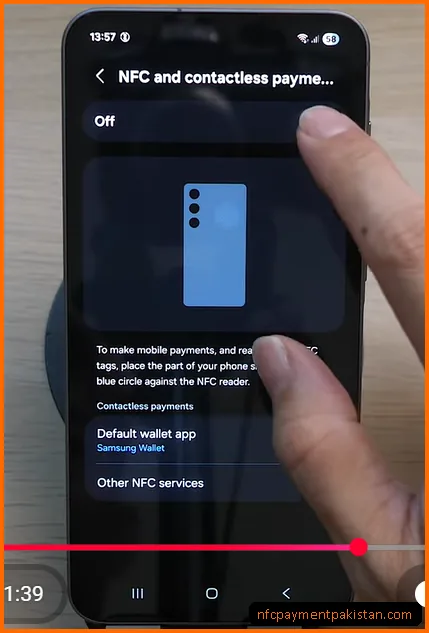
- Set the Default Wallet App: In the NFC settings menu, tap
Default wallet appand selectGoogle Wallet. This is critical if you have multiple bank apps installed that compete for payment handling.
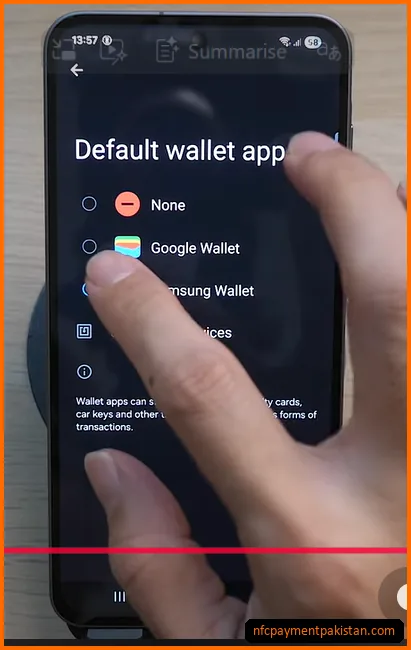
- Unlock Your Device: For security, Google Wallet requires you to unlock your device using biometrics (fingerprint/face unlock) or your backup PIN code before tapping.
- Check Phone Case Thickness: Bulky plastic, leather, or metallic phone cases can block short-range wireless signals. Try removing the case and tapping the bare phone back directly against the POS reader.
- Verify SafetyNet Certification: Rooted phones, custom ROMs, or devices with unlocked bootloaders fail SafetyNet security checks. Google Wallet automatically disables Tap & Pay on uncertified systems to prevent card fraud.
For details on Google Wallet setup limits, see our dedicated Google Wallet Pakistan Setup Guide.
2. POS Terminal Issues and Tap Distance
Even if your phone is configured correctly, checkout terminals can block contactless transactions due to merchant configuration or physical read errors.
3. Bank and Card Restrictions
Sometimes the hardware connection is successful, but the card issuer declines the payment authorization. This typically stems from card limit settings or transaction controls. To check if your specific card tier is supported, see the updated Google Wallet Supported Banks Pakistan List.
- NFC Option Blocked: Many banks require you to activate the “contactless” option inside their mobile banking app before you can use the feature. Log into your app, go to card control settings, and verify contactless use is enabled.
- International/E-commerce Toggle: Since Google Wallet tokenization handles payments through digital channels, some card processors route the authentication as an online transaction. Ensure e-commerce/online payments are active on your card.
- Exceeded Contactless Limit: Contactless checkouts without a PIN are limited to a transaction ceiling set by each issuer. Many Pakistani banks cap this at PKR 5,000 per transaction for their contactless cards, though the exact limit varies by bank and card tier. For amounts above the bank’s threshold, the POS terminal will prompt you to insert your physical card and enter a PIN.
For more details on fintech cards (like SadaPay or NayaPay), see the SadaPay & NayaPay NFC Guide.
4. Google Wallet Activation & OTP Failures
If you encounter unsupported card errors, check our dedicated guide: How to Fix Google Wallet Card Not Supported in Pakistan.
The card activation process requires an OTP (One-Time Password) confirmation from your bank to verify identity. If you are not receiving the OTP, check the following:
NFC Payment Troubleshooting FAQ
Why does the POS terminal ask for a PIN after I tap my phone?
This is a standard security protocol. If the transaction amount exceeds the bank’s contactless limit, or if the merchant terminal requires extra validation, the machine will ask for your card’s PIN. Input the PIN on the POS keypad to complete the payment.
Can I use Tap & Pay while my phone has no internet connection?
Yes. Google Wallet stores secure tokens on your device’s hardware. You can complete several offline tap transactions without active cellular data or Wi-Fi, though you will need internet connectivity later to refresh the security tokens.
Why does my phone buzz but no payment is processed?
If the phone vibrates but the terminal doesn’t respond, it usually means the phone’s NFC chip detected a signal but the POS terminal wasn’t ready to receive it, or your default wallet settings are incorrect. Ensure Google Wallet is selected as the default payment app.
For more guidance on NFC requirements, check out our general NFC Payment Pakistan Guide.