Google Wallet Supported Banks Pakistan: Updated 2026 List
Google Wallet Supported Banks Pakistan: Updated List
Google Wallet is officially available in Pakistan, but support is determined at the issuer and card-type level. Below is the updated directory of supported banks and card networks in Pakistan, based on Google’s official supported payment methods documentation:
| Bank / Card Issuer | Supported Card Types & Networks |
|---|---|
| Allied Bank Limited (ABL) | Visa Debit Cards (Note: UnionPay/PayPak cards use native myABL app instead) |
| Askari Bank | Visa Debit Cards. Read our Askari Bank Google Wallet Guide. |
| Bank Alfalah Limited | Visa Debit & Credit Cards, Mastercard Debit & Credit Cards |
| Easypaisa Digital Bank | Visa Debit Cards. Read our Easypaisa Google Wallet Guide. |
| Faysal Bank Limited | Mastercard Debit & Credit Cards (including Noor card products) |
| Habib Bank Limited (HBL) | Visa Debit & Credit Cards, Mastercard Debit & Credit Cards |
| Habib Metropolitan Bank | Visa Debit Cards |
| JazzCash | Mastercard Debit Cards |
| JS Bank / Zindigi | Visa Debit Cards. Read our Zindigi Google Wallet Guide. |
| Meezan Bank Limited | Visa Debit Cards, Mastercard Debit Cards |
| The Bank of Punjab (BOP) | Mastercard Credit Cards |
| United Bank Limited (UBL) | Visa Debit Cards, Mastercard Debit & Prepaid Cards |
Google notes that each banking partner determines card eligibility. Banks may restrict specific card tiers or blocks from being tokenized. For general setup instructions, see our Google Wallet Pakistan Setup Guide.
Important: Not Every Card from a Supported Bank Will Work
A common point of confusion is assuming that if a bank is listed, all cards issued by that bank will automatically work inside Google Wallet. Card eligibility is highly specific:
How to Setup Contactless Card Tapping on Android
To use Google Wallet for tap-to-pay transactions at merchant POS terminals, you need an Android phone with Near Field Communication (NFC) hardware. To purchase a compatible budget smartphone, check our directory of budget NFC enabled phones in Pakistan.
To set up your eligible card:
- Download and install the official Google Wallet application from the Google Play Store.
- Open the app, tap
Add to Wallet, selectPayment card, and input your card details. - Review and accept the bank’s issuer terms.
- Input the OTP (One-Time Password) sent to your registered mobile number or email to complete tokenization.
- Go to your phone settings, access connections, and toggle on NFC.
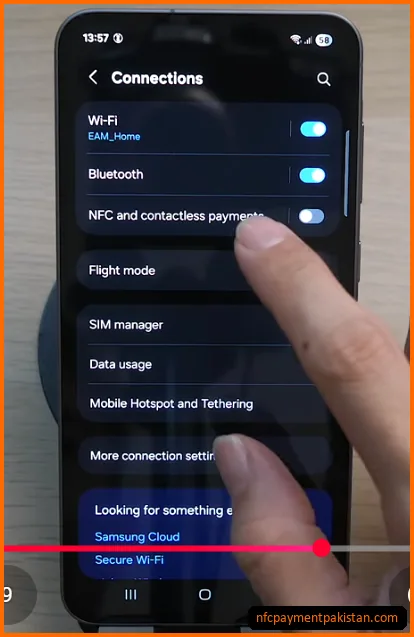
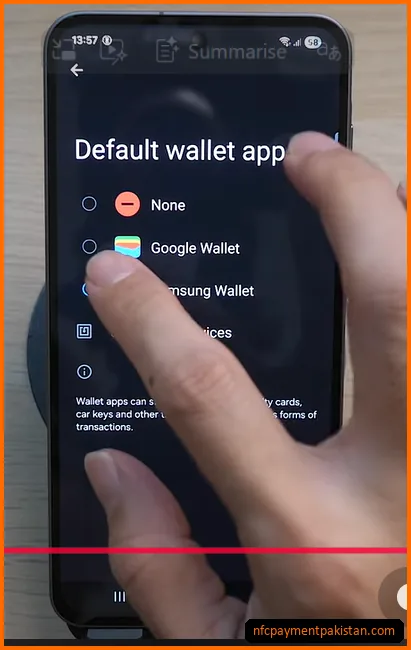
- Tap on
Default wallet appand select Google Wallet to handle POS transactions.
Why Your Card May Show “Not Supported” Errors
If your card setup fails immediately during card number entry, it usually points to a backend or settings configuration mismatch. Common causes include:
- E-commerce Blocked: Many banks require international e-commerce or online payments to be toggled on inside their banking app before card tokenization can be authorized.
- Rooted Devices: Google Wallet checks your device’s SafetyNet / Play Integrity status. If your bootloader is unlocked, the app will block payment setup for security.
- Alternative App Overrides: For Allied Bank UnionPay/PayPak cards or National Bank (NBP) virtual cards, you must use their native apps. Check our myABL Tap and Pay Guide and NBP Digital Tap and Pay Guide to configure those native services.
For terminal tap failures and screen-lock settings diagnostics, refer to our NFC Payment Troubleshooting Guide.
Digital Payment Growth in Pakistan
contactless payment usage is growing quickly. According to the State Bank of Pakistan’s (SBP) payment systems update for Q3 FY26 (ending March 2026), 3.7 billion retail transactions worth PKR 168.8 trillion were processed through commercial banking and P2P channels. SBP reports that 92% of retail payments are now conducted digitally, highlighting why mobile NFC solutions like Google Wallet are becoming a staple for local consumers. Read our full analysis of the Pakistan Digital Payments Q3 FY26 SBP Report for details, or see how NFC compares to other rails in our guide on Raast P2M vs NFC Tap & Pay vs QR Payments.
Google Wallet Bank FAQs
Does Allied Bank work with Google Wallet in Pakistan?
Yes, but only for selected Visa Debit Cards. Allied Bank’s UnionPay and PayPak debit cards are not compatible with Google Wallet and must be set up via the myABL Tap & Pay app instead.
Does Easypaisa work with Google Wallet?
Yes. Easypaisa Digital Bank Visa Debit Cards are officially listed as supported by Google Wallet in Pakistan. Always check your specific card status inside the Easypaisa app.
Does Zindigi work with Google Wallet?
Yes, JS Bank / Zindigi Visa Debit Cards are supported for Google Wallet tokenization.
Why is my supported bank card showing unsupported?
Your specific card type (e.g., PayPak co-badge, unionpay) or card network may be ineligible, or your bank has blocked e-commerce channels. Contact your bank’s helpline to verify card-level mobile tokenization support. For specific setup diagnostics, view our troubleshooting guide on Fixing Google Wallet Card Not Supported in Pakistan.